Stop Maintaining Okta Groups by Hand: Attribute-Based Access Control with Scimify Dynamic Groups
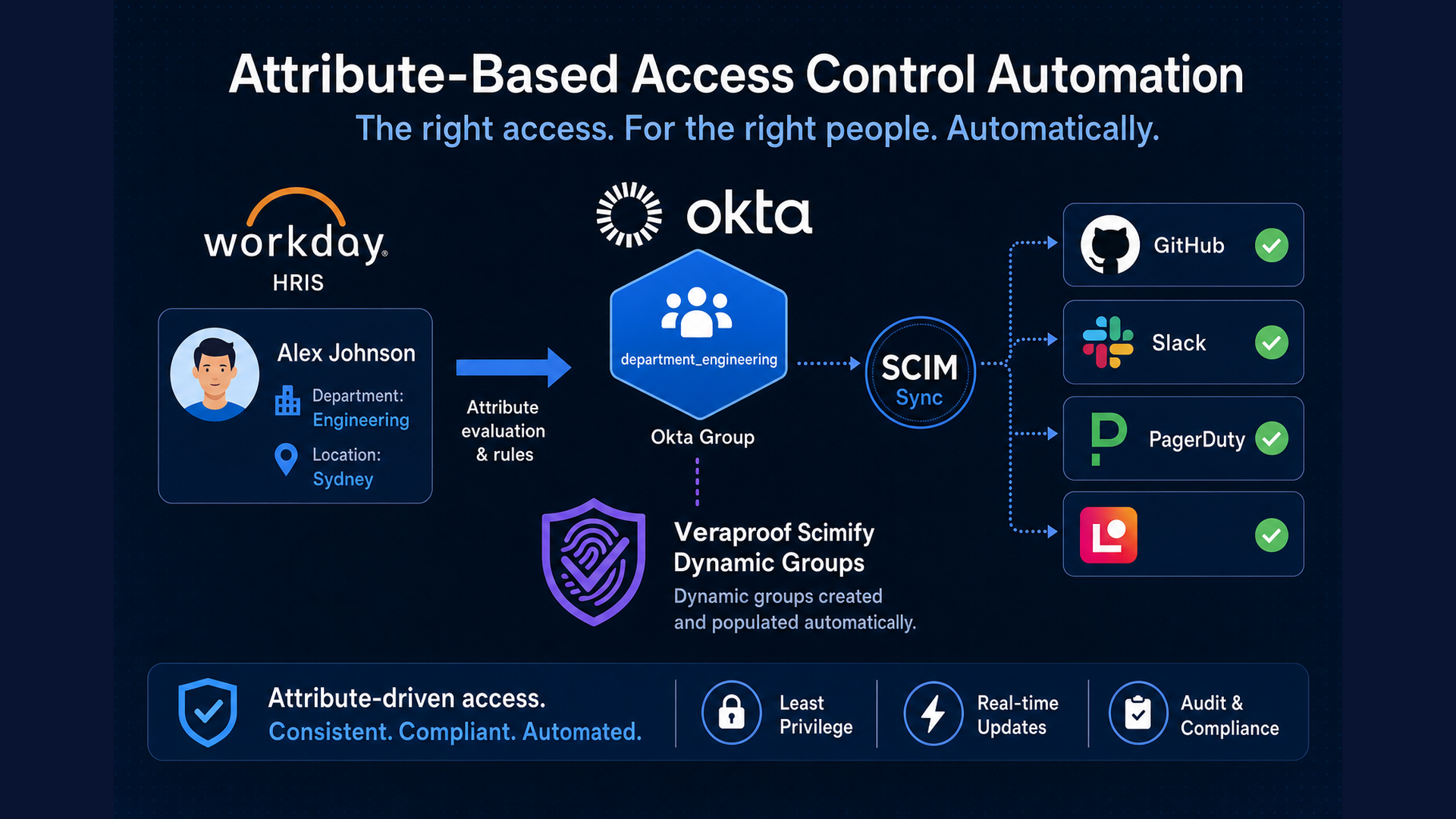
Your security team wants access tied to org structure. Your IT team is tired of being the bottleneck every time HR runs a reorg.
Sound familiar?
A new department splits off from Engineering. HR updates Workday. Okta profiles change. And then someone on the IAM team spends the next week:
- Creating new Okta groups
- Updating group rules or memberships by hand
- Re-assigning app access in Okta
- Chasing down GitHub, Slack, and PagerDuty admins to mirror the same structure in each tool
Meanwhile, a platform engineer who transferred to the new team still has last quarter’s GitHub repo access. A Slack usergroup still @ mentions people who moved to a different division. PagerDuty still routes alerts to a team name that no longer exists in anyone’s org chart.
Function leaders and HR maintain org structure in the HRIS. IT maintains groups in Okta and downstream apps. Two org charts. Constant drift.
Groups are not the problem. Manual group lifecycle and HR/IT misalignment are.
This post explains why groups remain the right access primitive for IT, Identity, and Security teams - and how Scimify Dynamic Groups automates Okta group creation and membership from user profile attributes. The groups Dynamic Groups creates are ordinary Okta groups: use them for app assignment, group rules, access policies, and any other group workflow in Okta.
Why groups still matter
Every major IdP and IGA platform speaks groups. They are the portable unit for:
- App assignment in Okta — who gets which SaaS applications
- Entitlements in IGAs like Lumos — what users can request and what approvers can grant
- Downstream RBAC — when apps support group or team sync via SCIM
The pattern is attribute-based access control via groups: user profile attributes drive group membership; groups drive provisioning and permissions. You do not need every application to understand department or costCenter directly — groups translate org structure into something apps already know how to enforce.
That is why enterprises audit group membership, run access reviews against groups, and build access request workflows around them. The challenge is keeping those groups accurate as the organization changes.
HRIS as source of truth: one org chart, not two
Most enterprises already treat the HRIS - Workday, SAP SuccessFactors, BambooHR, or similar - as the authoritative record for org structure, roles, and reporting lines. Function leaders work with HR to make changes there. Those changes sync into Okta as user profile attributes: department, division, costCenter, title, manager, location, and custom fields your HRIS maps.
The gap is what happens after attributes land in Okta.
Without automation, IT still maintains a parallel set of Okta groups and app assignments that are supposed to reflect the same org data—but only update when someone remembers to act. Reorgs become IAM projects. Movers accumulate stale memberships. Security reviews surface groups that no longer match HR’s view of the world.
Scimify Dynamic Groups closes that loop:
- HR and function leaders update org structure in the HRIS
- HRIS → Okta: profile attributes sync to user profiles
- Scimify Dynamic Groups → Okta groups: attribute rules automatically create and populate groups from those fields
- Assign those Okta groups to applications: native Okta SCIM group push to apps with built-in SCIM provisioning, Scimify SCIM connectors for apps without native SCIM, or any other Okta group assignment your org already uses
Dynamic Groups operates on attributes already in Okta — regardless of which HRIS connector populated them. It complements HRIS→Okta user provisioning; it does not replace it.
For IT and IAM: Fewer “fix my groups after the reorg” tickets. One attribute rule scales with HR-driven changes instead of a backlog of manual edits.
For Security: Access groups tied to authoritative HR data, not stale manually curated lists.
For function leaders: Org changes in the HRIS propagate to tooling without a separate IT change request for every new department or team.
When a reorg empties a deprecated department, Show stale groups in the Dynamic Groups integration surfaces zero-member groups — useful signal before you remove app ACLs or delete the Okta group.
Okta group rules vs Scimify Dynamic Groups
Okta customers often ask: “Doesn’t Okta already do this?”
Partially. Okta supports group rules that automatically add or remove members based on user profile attributes — for example, “if department equals Engineering, add to Engineering group.” That works well for attribute-driven membership on existing groups.
Where native group rules break down at scale:
| Gap | Okta group rules | Scimify Dynamic Groups |
|---|---|---|
| Group creation | Each group must be created manually in Okta before a rule can target it | Scimify creates a new Okta group automatically when a new unique attribute value appears |
| Rule maintenance | Typically one rule per group/value—expressions reference specific attribute values | Configure one attribute rule (e.g. profile.department with prefix department_); Scimify’s group engine handles all current and future values |
| Operational overhead | Grows with org change—new cost centers, regions, and departments require admin work in two places (groups + rules) | Attribute path + prefix scales with org growth; Assess previews new groups before sync |
| Lack of enforcement | Users that are temporarily or accidentally removed from groups managed by group rules, end up in the group rules exclusion list and automation breaks | Membership policy governs how to treat direct group membership changes and can force membership even if users are accidentally removed |
Okta group rules populate membership for groups you already manage. Scimify Dynamic Groups auto creates AND populates groups from attribute values — including values that did not exist when you first configured the integration — without writing a new rule every time the org changes.
Example: HR adds Platform Reliability as a new department after a reorg. With Dynamic Groups, Scimify auto creates department_platform_reliability on the next sync and adds members whose profile.department matches. With Okta group rules alone, an admin must first manually create the group and write or update the group rule.
How Scimify Dynamic Groups works
Dynamic Groups creates and maintains Okta groups based on user profile attribute values. It uses the Okta Management API directly — it does not require a separate SCIM app in Okta for Dynamic Groups itself.
At a high level:
- Scimify reads active Okta users and their profile attributes on an hourly schedule (with Sync now available on demand)
- For each attribute rule, you define the group naming schema: an Okta profile attribute path (e.g.
profile.department), a group name prefix (e.g.department_), and name normalization (underscores or hyphens). Scimify creates one Okta group per unique attribute value using that schema — for example, prefixdepartment_plus valueEngineeringbecomesdepartment_engineering - Scimify’s group engine reconciles membership every sync — no per-value rule expressions to maintain
- Assess previews how many groups will be created, sample names, and member counts before you enable sync
- Show groups and Show stale groups help you verify managed groups and plan cleanup after reorgs
Setup uses a least-privilege Okta API token scoped to read users and schemas and manage groups—see the Dynamic Groups configuration guide for the full permission list.
Dynamic Groups creates and manages groups in Okta today. The groups story is universal across IdPs and IGAs, but this integration is built for Okta customers who want HRIS-aligned groups without manual upkeep.
End-to-end flow: HRIS attribute → group → app
The full chain from org structure to application access:
- HR maintains org structure in the HRIS; attributes sync to Okta user profiles
- Configure attribute rules in Scimify Dynamic Groups — each rule defines the attribute path, group name prefix, and normalization (e.g.
profile.departmentwith prefixdepartment_) - Use the generated Okta groups like any other Okta group: app assignments, admin roles, conditional access, IGA entitlements, and so on
- Push groups to downstream apps using whichever path fits each application:
- Native Okta SCIM — assign groups to Okta-integrated apps and configure group push for vendors that support it out of the box
- Scimify SCIM connectors — assign groups to Veraproof Scimify SCIM apps and push to Jamf, GitHub, Slack, PagerDuty, and other integrations; see Okta SCIM Configuration
- Optional: expose groups as entitlements in Lumos for access request workflows
Dynamic Groups solves group creation and membership in Okta. Where those groups flow next is up to you — Scimify is one provisioning path, not the only reason to adopt the feature.
Cardinality matters: prefer low-cardinality HRIS fields—department, location, cost center, division—over high-cardinality fields like individual job titles unless you intend to manage hundreds of groups. Use Assess before enabling sync to preview the impact.
One config decision worth calling out upfront: membership policy. Choose Respect manual changes if you need to preserve ad hoc Okta membership additions, or Enforce Dynamic Groups if Scimify should fully reconcile membership to current attribute values every sync.
Real-world scenarios
These examples show how HRIS-aligned Dynamic Groups flow through to apps teams already run on Scimify.
Engineering access via GitHub teams
A mid-size SaaS company maps profile.department to groups with prefix department_. When HR creates a new engineering sub-team in Workday, Okta profiles update and Dynamic Groups creates department_platform_reliability on the next sync.
That Okta group is assigned to the Scimify GitHub integration with Okta group push. A new Github Team is automatically created via Scimify. Repo and team access follows org structure without weekly GitHub admin work. Engineers who transfer departments lose old team membership and gain new membership automatically.
Regional comms via Slack usergroups
An Enterprise Grid customer groups on profile.division, producing groups like divisions_emea. Those groups push to Slack usergroups via Scimify—channel workflows, @ mentions, and usergroup-based automations stay current after reorgs without a separate Slack admin project for every structural change.
On-call coverage via PagerDuty teams
An organization uses a custom HRIS-synced team attribute to represent Security Operations employees. Dynamic Groups maintains team_security_operations in Okta; group push provisions the matching PagerDuty team. On-call rotations reflect real team membership instead of a snapshot from last quarter’s manual update — as we covered in automating PagerDuty team management with SCIM.
Access requests via Lumos entitlements
The same dynamic groups appear as requestable entitlements in Lumos. A developer requests time-based access to the “Platform Engineering” Github team, while pairing on a project, the Platform Eng manager approves in Lumos. Scimify provisions group membership to the Platform Engineering team in GitHub via SCIM.
Groups as requestable entitlements close the loop between governance and technical enforcement: approval in the IGA triggers provisioning through Scimify—no separate ticket to IT to “add them to the group.”
Governance, hygiene, and compliance
Dynamic Groups fits naturally into identity governance without turning this into a full audit-framework post.
Governance: One group per entitlement. Access reviews in Lumos map to real Okta and app membership. Org changes originate in the HRIS — not ad hoc IT group edits that drift from HR’s record.
Hygiene: After HRIS-driven reorgs, Show stale groups surfaces managed groups with zero members — signal to review app ACLs tied to those groups before deleting them in Okta.
Compliance: Membership derived from authoritative HRIS → Okta profile attributes means fewer “forgot to remove from group X” findings when movers and leavers propagate through downstream SCIM deprovisioning.
Getting started
- Configure Dynamic Groups — Okta API token, attribute rules (attribute path, name prefix, normalization), Assess, Enable
- Assign dynamic groups in Okta — native SCIM group push to supported apps, and/or Okta SCIM group push to Scimify for connector-backed integrations
- Connect downstream integrations — GitHub, Slack usergroups, PagerDuty, Lumos
Use Discover attributes in the Dynamic Groups config to list Okta profile fields synced from your HRIS, then Assess each rule before your first sync.
Stop maintaining a parallel org chart in Okta
Groups are how IdPs, IGAs, and SCIM-connected apps agree on who gets access. The overhead comes from creating and updating those groups by hand every time HR changes the org.
Scimify Dynamic Groups lets HRIS-driven attributes flow from Okta into automatically managed groups — and from there into whatever your Okta group model already supports: native SCIM apps, Scimify connectors for GitHub, Slack, PagerDuty, Lumos, and the rest of your IdP and IGA workflows.
Ready to align Okta groups with your HRIS and automate downstream provisioning? Get started with Scimify or contact support@veraproof.io for help with Dynamic Groups setup.